
Best MSI Laptop for Video Editing (2026): 15 Picks
This guide ranks 15 MSI laptops for video editing, drawn from 22 MSI listings that name an RTX graphics card. The top pick is the MSI Titan 18, with 64GB of RAM, a GeForce RTX 5090 with 24GB of stated graphics memory, and a 2TB SSD. Every pick here is compared on the details stated in its listing and on its live price, so the order reflects stated specifications, not guesses.
15 picks from 27 laptops that match this guide with a price we can quote today. Every price below is live and carries the moment it was read.
The picks at a glance
Which one should you buy?
- For 4K wedding or event footage: Long timelines and large media files call for more RAM and more storage. The 64GB picks in this list give room for a busy project, and the 4TB SSD on the Vector 16 HX AI holds a lot of footage. See pick 2
- For a film course with long projects: Students working on multi-week projects will appreciate the 64GB RAM on the top picks, which leaves space for many open programs and a long timeline. See pick 1
- For editing in a hotel room between shoots: A lighter laptop is easier to carry between locations. The Cyborg A15 AI is the lightest here at 1.95kg, and still names a 1TB SSD for footage. See pick 13
- For short social clips on a phone-shot workflow: Small projects need less, but a 16GB pick with a 165Hz screen can still keep a timeline organized. The Katana 15 HX offers 32GB if you need more headroom. See pick 10
The 15 picks
1 Most RAM and graphics memory in this list

msi Titan 18" Gaming Laptop
- CPU
- Intel Core Ultra 9 290HX
- GPU
- GeForce RTX 5090
- GPU memory
- 24 GB
- RAM
- 64 GB
- Storage
- 2000 GB
- Screen
- 18 in
- Refresh
- 120 Hz
- Weight
- 3.6 kg
$7,699.00 (as of 11/01/2026 20:27 PST - Details)
It ranks first because it has the most RAM (64GB) and the most stated graphics memory (24GB) among the picks, and a 2TB SSD places it ahead of other 64GB picks with less storage. Its 18-inch screen is the largest size alongside the Crosshair 18 models.
Pros
- 64GB RAM, the most in this list
- GeForce RTX 5090 with 24GB stated graphics memory, the most here
- 2TB SSD for large project files
- Windows 11 Pro
Cons
- Heaviest at 3.6kg
- 120Hz refresh, lower than some other picks
Good fit if
- Editors working on long, multi-camera projects
- Those who want maximum stated memory and graphics memory
Skip if
- You need a lighter laptop to carry between shoots
- You prefer a 240Hz display
Verdict: The MSI Titan 18 leads this list on stated RAM and graphics memory, making it a strong candidate for demanding video editing workloads.
2 Most storage in this list: 4TB

msi Vector 16 HX AI 16" QHD+ 240Hz Gaming Laptop
- CPU
- Intel Core Ultra 9 275HX
- GPU
- GeForce RTX 5080
- GPU memory
- 16 GB
- RAM
- 64 GB
- Storage
- 4000 GB
- Screen
- 16 in
- Refresh
- 240 Hz
- Weight
- 2.7 kg
$4,699.00 (as of 11/01/2026 20:27 PST - Details)
Ranks second because it matches the 64GB RAM of the Titan but has 16GB graphics memory, which is less than the Titan's 24GB, and its 4TB storage is the largest here, ahead of other 64GB picks.
Pros
- 64GB RAM
- 16GB stated graphics memory
- 4TB SSD, the most storage in this list
- Windows 11 Pro
Cons
- Heavier at 2.7kg
- 16-inch screen smaller than the 18-inch models
Good fit if
- Editors who store footage directly on the laptop
- Those who need both 64GB RAM and large storage
Skip if
- You want the maximum graphics memory (Titan offers 24GB)
- You prefer a large 18-inch display
Verdict: The Vector 16 HX AI with 4TB offers 64GB RAM and the most storage among these MSI picks.
3 64GB RAM and 16GB graphics memory

msi Vector A16 HX 16" QHD+ 240Hz Gaming Laptop
- CPU
- AMD Ryzen 9 8940HX
- GPU
- GeForce RTX 5080
- GPU memory
- 16 GB
- RAM
- 64 GB
- Storage
- 2000 GB
- Screen
- 16 in
- Refresh
- 240 Hz
- Weight
- 2.7 kg
$3,299.00 (as of 11/01/2026 20:27 PST - Details)
Ranks third because it matches the 64GB RAM and 16GB graphics memory of pick 2 but has 2TB storage, which is less than the 4TB of pick 2. Its title says 3TB but the stated details list 2TB, so it falls behind on storage.
Pros
- 64GB RAM
- 16GB stated graphics memory
- 2TB SSD
- Windows 11 Pro
Cons
- Title says 3TB storage but stated details list 2TB, read the listing
- Weight 2.7kg
Good fit if
- Editors who want 64GB RAM and a 16GB GPU
- Those comfortable checking the listing for exact storage
Skip if
- You need the largest storage (pick 2 has 4TB)
- You want a smaller weight
Verdict: This Vector A16 HX provides 64GB RAM and 16GB graphics memory, though its storage figure should be verified in the listing.
4 64GB RAM and a 240Hz display

MSI Crosshair 18 HX AI Gaming Laptop 18" QHD+ 240Hz
- CPU
- Intel Core Ultra 9 275HX
- GPU
- GeForce RTX 5070
- GPU memory
- 8 GB
- RAM
- 64 GB
- Storage
- 1000 GB
- Screen
- 18 in
- Refresh
- 240 Hz
- OS
- Windows 11
$2,749.00 (as of 11/01/2026 20:27 PST - Details)
Ranks fourth among 64GB picks because it has 8GB stated graphics memory, less than the 16GB of the Vector models, and 1TB storage. It still offers 64GB RAM and a large 18-inch screen with a 240Hz refresh.
Pros
- 64GB RAM
- 18-inch screen with 240Hz refresh
- 1TB SSD
- Windows 11
Cons
- 8GB graphics memory, less than other 64GB picks
- Weight not stated by the seller
Good fit if
- Editors who value a large 18-inch screen with a high refresh rate
- Those who need 64GB RAM but not the largest storage
Skip if
- You want more graphics memory (16GB or 24GB)
- You need more than 1TB of storage
Verdict: The Crosshair 18 HX AI offers 64GB RAM on an 18-inch 240Hz display, making it a solid choice for RAM-heavy projects.
5 32GB RAM and 2TB storage with 16GB graphics memory
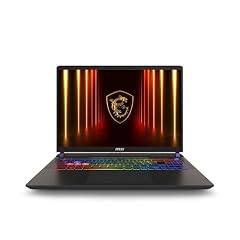
msi Vector 16 HX AI 16” 240Hz QHD+ Gaming Laptop
- CPU
- Intel Core Ultra 9
- GPU
- GeForce RTX 5080
- RAM
- 32 GB
- Storage
- 2000 GB
- Screen
- 16 in
- Refresh
- 240 Hz
- Weight
- 2.7 kg
- OS
- Windows 11 Pro
$2,781.88 (as of 11/01/2026 20:27 PST - Details)
Ranks fifth because it drops to 32GB RAM but keeps 16GB graphics memory, and its 2TB storage is higher than the other 32GB 16GB-VRAM pick which has 1TB. It sits after the 64GB picks in the order.
Pros
- 32GB RAM
- 16GB stated graphics memory
- 2TB SSD
- 240Hz display
Cons
- 32GB RAM is half of the top models
- Weight 2.7kg
Good fit if
- Editors who need 16GB graphics memory but not 64GB RAM
- Those who want 2TB storage
Skip if
- You plan to work on very long timelines that benefit from 64GB
- You prefer a lighter machine
Verdict: A balanced 32GB pick with 16GB graphics memory and 2TB storage.
6 32GB RAM and 16GB graphics memory with 1TB SSD

msi Vector 16 HX AI 400 Gaming Laptop
- CPU
- Intel Core Ultra 9
- GPU
- RTX 5080
- GPU memory
- 16 GB
- RAM
- 32 GB
- Storage
- 1000 GB
- Screen
- 16 in
- Refresh
- 240 Hz
- Weight
- 2.7 kg
$2,809.00 (as of 11/01/2026 20:27 PST - Details)
Ranks sixth because it has 32GB and 16GB graphics memory but only 1TB storage, placing it after the 2TB pick with the same RAM and GPU.
Pros
- 32GB RAM
- 16GB stated graphics memory
- 1TB SSD
- 240Hz display
Cons
- 1TB storage is smaller than pick 5's 2TB
- Weight 2.7kg
Good fit if
- Editors who want 16GB graphics memory and are fine with 1TB
- Those who need a 240Hz display
Skip if
- You need more than 1TB of storage
- You want to avoid the higher weight
Verdict: This Vector 16 HX AI offers 32GB RAM and 16GB graphics memory in a 16-inch frame.
7 32GB RAM and 2TB storage on an 18-inch screen

msi Crosshair 18 HX AI Gaming Laptop 18" QHD+ 240Hz 100% DCI-P3 Intel
- CPU
- Intel Core Ultra 9 275HX
- GPU
- GeForce RTX 5070
- GPU memory
- 8 GB
- RAM
- 32 GB
- Storage
- 2000 GB
- Screen
- 18 in
- Refresh
- 240 Hz
- OS
- Windows 11 Pro
$2,249.99 (as of 11/01/2026 20:27 PST - Details)
Ranks seventh because it has 32GB RAM and 8GB graphics memory, less than the 16GB of pick 5 and 6, but its 2TB storage puts it ahead of other 32GB 8GB picks with 1TB.
Pros
- 32GB RAM
- 2TB SSD
- 18-inch display with 240Hz refresh
- RTX 5070
Cons
- 8GB graphics memory
- Weight not stated by the seller
Good fit if
- Editors who want a large 18-inch screen and 2TB storage
- Those who don't need 64GB RAM
Skip if
- You need more graphics memory (16GB or 24GB)
- You want a lighter laptop
Verdict: A 32GB Crosshair with 2TB storage and an 18-inch 240Hz display.
8 32GB RAM with a stated 90Wh battery

msi Crosshair 18 HX AI 18" 2560x1600 240Hz Display Gaming Laptop
- CPU
- Intel Core Ultra 9 275HX
- GPU
- RTX 5070
- GPU memory
- 8 GB
- RAM
- 32 GB
- Storage
- 1000 GB
- Screen
- 18 in
- Refresh
- 240 Hz
- Weight
- 3.1 kg
$2,119.00 (as of 11/01/2026 20:27 PST - Details)
Ranks eighth because it has 32GB RAM and 8GB graphics memory, same as pick 7, but its 1TB storage is less, so it falls after. It does state a 90Wh battery, a detail the other Crosshair picks lack.
Pros
- 32GB RAM
- 90Wh battery capacity stated
- 18-inch 240Hz display
- 1TB SSD
Cons
- 8GB graphics memory
- 1TB storage is less than pick 7's 2TB
Good fit if
- Editors who want a stated battery capacity figure
- Those who prefer an 18-inch screen
Skip if
- You need more storage
- You want more graphics memory
Verdict: This Crosshair 18 offers 32GB RAM and a stated 90Wh battery, with a 1TB SSD.
9 Lighter 32GB 16-inch at 2.5kg

msi Crosshair A16 HX 16” 2.5K QHD+ 240Hz Gaming Laptop
- CPU
- AMD Ryzen 9 8940HX
- GPU
- GeForce RTX 5070
- RAM
- 32 GB
- Storage
- 1000 GB
- Screen
- 16 in
- Refresh
- 240 Hz
- Weight
- 2.5 kg
- OS
- Windows 11 Home
$2,699.00 (as of 11/01/2026 20:27 PST - Details)
Ranks ninth because it has 32GB RAM and 8GB graphics memory, but its 16-inch size and lower weight (2.5kg) place it after the 18-inch models in the order, which is based on RAM, VRAM, storage, and pool order. Among 32GB picks with 8GB and 1TB, it's after the 18-inch ones.
Pros
- 32GB RAM
- 1TB SSD
- 16-inch display with 240Hz refresh
- Weight 2.5kg, lighter than other 16-inch picks here
Cons
- 8GB graphics memory
- 1TB storage
Good fit if
- Editors who want a 32GB laptop that's easier to carry
- Those who like a 16-inch screen
Skip if
- You need a larger 18-inch display
- You want more graphics memory
Verdict: A 32GB 16-inch Crosshair that weighs 2.5kg.
10 32GB RAM on a 15.6-inch screen with 165Hz

msi Katana 15 HX 15.6” 165Hz QHD+ Gaming Laptop
- CPU
- Intel Core i9-14900HX
- GPU
- GeForce RTX 5070
- RAM
- 32 GB
- Storage
- 1000 GB
- Screen
- 15.6 in
- Refresh
- 165 Hz
- Weight
- 2.25 kg
- OS
- Windows 11 Home
$2,158.09 (as of 11/01/2026 20:27 PST - Details)
Ranks tenth because it has 32GB RAM and 8GB graphics memory, but its 15.6-inch screen is smaller than the 16- and 18-inch picks, and it has 1TB storage. It sits after the larger-screen picks of the same RAM class.
Pros
- 32GB RAM
- 1TB SSD
- 15.6-inch display with 165Hz refresh
- Weight 2.25kg, lighter than many
Cons
- 8GB graphics memory
- 15.6-inch screen smaller than others
Good fit if
- Editors who prefer a compact 15.6-inch laptop with 32GB
- Those who value a lower weight
Skip if
- You want a larger screen
- You need more than 8GB graphics memory
Verdict: A portable 15.6-inch Katana with 32GB RAM.
11 32GB RAM and a 1TB SSD

msi Katana A15 AI Gaming Laptop 15.6” QHD 165Hz
- GPU
- RTX 4070
- RAM
- 32 GB
- Storage
- 1000 GB
- Screen
- 15.6 in
- Refresh
- 165 Hz
- Weight
- 2.7 kg
- OS
- Windows 11
$1,699.99 (as of 11/01/2026 20:27 PST - Details)
Ranks eleventh because it matches the 32GB RAM and 1TB storage of pick 10, but its processor is not stated in the details, placing it after picks with a stated processor. It also has a 165Hz display.
Pros
- 32GB RAM
- 1TB SSD
- 15.6-inch with 165Hz refresh
- Windows 11
Cons
- Processor not stated by the seller
- 8GB graphics memory
Good fit if
- Editors who are flexible on processor details
- Those who want 32GB in a Katana line
Skip if
- You want a stated processor model
- You need more graphics memory
Verdict: This Katana A15 AI offers 32GB with a 1TB SSD, though the processor is not stated.
12 32GB RAM and a 17-inch display

msi Vector 17 HX Gaming Laptop
- CPU
- Intel Core i9-14900HX
- GPU
- GeForce RTX 4070
- RAM
- 32 GB
- Storage
- 1000 GB
- Screen
- 17 in
- OS
- Windows 11 Home
Ranks twelfth because it has 32GB RAM and 1TB storage, but its graphics memory is not stated, so it falls after picks that state 8GB or 16GB. Its 17-inch screen is a unique size in this list.
Pros
- 32GB RAM
- 17-inch display
- 1TB SSD
- RTX 4070
Cons
- Graphics memory not stated by the seller
- Weight and refresh rate not stated
Good fit if
- Editors who want a 17-inch screen without going to 18
- Those who need 32GB RAM
Skip if
- You rely on a stated graphics memory figure
- You need a high refresh rate
Verdict: A 17-inch Vector with 32GB RAM and a stated RTX 4070.
13 Lightest stated weight in this list

msi Cyborg A15 AI 15.6” FHD 144Hz Thin & Light Gaming Laptop
- CPU
- AMD Ryzen 7 260
- GPU
- GeForce RTX 5050
- RAM
- 16 GB
- Storage
- 1000 GB
- Screen
- 15.6 in
- Refresh
- 144 Hz
- Weight
- 1.95 kg
- OS
- Windows 11
$1,249.00 (as of 11/01/2026 20:27 PST - Details)
Ranks thirteenth because it has 16GB RAM, less than the 32GB picks, and its 1TB storage is matched by many. Its weight of 1.95kg is the lightest among all picks, which is a notable stated detail.
Pros
- 1.95kg weight, the lightest here
- 1TB SSD
- 15.6-inch with 144Hz display
- RTX 5050
Cons
- 16GB RAM is the lowest in this list
- Graphics memory not stated by the seller
Good fit if
- Editors who travel and want a light laptop
- Those working on shorter, less memory-intensive projects
Skip if
- You need 32GB or 64GB RAM
- You want a stated graphics memory figure
Verdict: The Cyborg is the lightest pick here, with 1TB storage and a 16GB RAM configuration.
14 16GB RAM with a 144Hz display

msi Thin 15 15.6” 144Hz FHD Gaming Laptop
- CPU
- Intel Core i7-13620H
- GPU
- GeForce RTX 4050
- RAM
- 16 GB
- Storage
- 512 GB
- Screen
- 15.6 in
- Refresh
- 144 Hz
- OS
- Windows 11
$1,149.99 (as of 11/01/2026 20:27 PST - Details)
Ranks fourteenth because it has 16GB RAM and 512GB storage, which is the smallest storage in this list. Its 144Hz refresh is stated, but weight is not.
Pros
- 16GB RAM
- 144Hz display
- RTX 4050
- 15.6-inch
Cons
- 512GB SSD, the smallest storage here
- Weight not stated by the seller
Good fit if
- Editors with modest storage needs
- Those who want a simple 16GB laptop
Skip if
- You need more storage
- You want a lighter laptop
Verdict: A Thin 15 with 16GB and 512GB, offering a 144Hz display.
15 16GB RAM with a 4K OLED title

msi Creator 15 Professional Laptop
- CPU
- Intel Core i7-11800H
- GPU
- GeForce RTX 3060
- RAM
- 16 GB
- Storage
- 512 GB
- Screen
- 15.6 in
- Weight
- 2.44 kg
- OS
- Windows 10
$1,799.00 (as of 11/01/2026 20:27 PST - Details)
Ranks last among 16GB picks because it has 16GB RAM and 512GB storage, and its title mentions a 4K OLED display, though no refresh or graphics memory is stated. It also runs Windows 10, which differs from the Windows 11 on other picks.
Pros
- 16GB RAM
- Title states 4K OLED display
- 512GB SSD
- RTX 3060
Cons
- Windows 10, not Windows 11
- Graphics memory and refresh not stated by the seller
- Older processor (i7-11800H) as titled
Good fit if
- Editors who want a 4K OLED title and are okay with Windows 10
- Those on a 16GB budget
Skip if
- You prefer Windows 11
- You need more storage
Verdict: This Creator 15 is a 16GB option with a 4K OLED title, though it runs Windows 10.
Side by side
| # | Laptop | CPU | GPU | GPU memory | Rentable GPU model | RAM | Storage |
|---|---|---|---|---|---|---|---|
| 1 | msi Titan 18" Gaming Laptop | Intel Core Ultra 9 290HX | GeForce RTX 5090 | 24 GB | not stated | 64 GB | 2000 GB |
| 2 | msi Vector 16 HX AI 16" QHD+ 240Hz Gaming Laptop | Intel Core Ultra 9 275HX | GeForce RTX 5080 | 16 GB | not stated | 64 GB | 4000 GB |
| 3 | msi Vector A16 HX 16" QHD+ 240Hz Gaming Laptop | AMD Ryzen 9 8940HX | GeForce RTX 5080 | 16 GB | not stated | 64 GB | 2000 GB |
| 4 | MSI Crosshair 18 HX AI Gaming Laptop 18" QHD+ 240Hz | Intel Core Ultra 9 275HX | GeForce RTX 5070 | 8 GB | not stated | 64 GB | 1000 GB |
| 5 | msi Vector 16 HX AI 16” 240Hz QHD+ Gaming Laptop | Intel Core Ultra 9 | GeForce RTX 5080 | not stated | not stated | 32 GB | 2000 GB |
| 6 | msi Vector 16 HX AI 400 Gaming Laptop | Intel Core Ultra 9 | RTX 5080 | 16 GB | not stated | 32 GB | 1000 GB |
| 7 | msi Crosshair 18 HX AI Gaming Laptop 18" QHD+ 240Hz 100% DCI-P3 Intel | Intel Core Ultra 9 275HX | GeForce RTX 5070 | 8 GB | not stated | 32 GB | 2000 GB |
| 8 | msi Crosshair 18 HX AI 18" 2560x1600 240Hz Display Gaming Laptop | Intel Core Ultra 9 275HX | RTX 5070 | 8 GB | not stated | 32 GB | 1000 GB |
| 9 | msi Crosshair A16 HX 16” 2.5K QHD+ 240Hz Gaming Laptop | AMD Ryzen 9 8940HX | GeForce RTX 5070 | not stated | not stated | 32 GB | 1000 GB |
| 10 | msi Katana 15 HX 15.6” 165Hz QHD+ Gaming Laptop | Intel Core i9-14900HX | GeForce RTX 5070 | not stated | not stated | 32 GB | 1000 GB |
| 11 | msi Katana A15 AI Gaming Laptop 15.6” QHD 165Hz | not stated | RTX 4070 | not stated | not stated | 32 GB | 1000 GB |
| 12 | msi Vector 17 HX Gaming Laptop | Intel Core i9-14900HX | GeForce RTX 4070 | not stated | not stated | 32 GB | 1000 GB |
| 13 | msi Cyborg A15 AI 15.6” FHD 144Hz Thin & Light Gaming Laptop | AMD Ryzen 7 260 | GeForce RTX 5050 | not stated | not stated | 16 GB | 1000 GB |
| 14 | msi Thin 15 15.6” 144Hz FHD Gaming Laptop | Intel Core i7-13620H | GeForce RTX 4050 | not stated | not stated | 16 GB | 512 GB |
| 15 | msi Creator 15 Professional Laptop | Intel Core i7-11800H | GeForce RTX 3060 | not stated | not stated | 16 GB | 512 GB |
How we picked
The pool for this guide is 22 MSI laptops whose listings name an RTX graphics card. From those, 15 configurations were chosen that differ in at least one stated detail: RAM, graphics memory, storage, screen size, or weight. The picks are ordered first by stated RAM (most first), then by stated graphics memory (most first), then by stated storage (most first), and finally by the order in the pool file. Listings that do not state a detail, such as graphics memory or weight, rank after those that do. Laptops are compared only on stated details and live prices; no claims are made about how any machine runs.
How to choose
RAM for long timelines
RAM is where a laptop holds open programs and the footage you are actively editing. A 64GB machine gives more room for a long timeline, many open applications, and large media files. 32GB is a common middle ground, while 16GB suits shorter projects. The pick order here is set first by stated RAM, with 64GB ahead of 32GB and 16GB.
Graphics name and graphics memory
The graphics card is named in each listing, such as GeForce RTX 5090 or RTX 5070. Some listings also state the amount of graphics memory, measured in GB. A larger stated number means more memory on the card, but this guide makes no claim about how any card performs in editing software. Listings that do not state graphics memory rank after those that do.
Storage for footage and an external drive
Footage and project files take space. A 2TB or 4TB SSD can hold a large library directly on the laptop, while a 512GB drive is better for short projects. Many editors keep an external drive for raw footage and use the internal drive for the active project. The guide lists storage as stated in each listing, and titles that combine a drive and an external device are flagged.
Screen size, weight and where you edit
A larger screen, such as 17 or 18 inches, shows more of a timeline at once, but a smaller 15.6-inch machine is easier to carry. The weight stated in each listing indicates how heavy the laptop is, so a lighter pick can be more comfortable in a bag. Choose based on whether you edit mainly at a desk or travel between locations.
Windows 11 and what this guide leaves out
Most of the picks here state Windows 11 Home or Pro, with one older model running Windows 10. The guide compares only the details in the listings: RAM, graphics, storage, screen size, weight, and operating system. It does not measure export times, color accuracy, fan noise, or whether a specific editing program runs well. Those questions are outside the catalogue data, and program makers publish their own requirements pages.
Questions
Does this guide cover export times, color accuracy, or whether a program runs?
No. The catalogue has no data for export times, color accuracy, or program compatibility. The guide compares laptops on stated details and live prices only. Program makers such as Adobe, Blackmagic Design, and Apple publish their own system requirements, and this site does not guess how a laptop will run a tool.
What does 'graphics memory' mean in the listings?
Graphics memory is the amount of memory on the graphics card, as stated in the listing. A larger number, such as 24GB versus 8GB, means more memory is present. This guide does not claim a relationship between that number and editing speed, only that the figure is stated by the seller.
Why are some listings missing details like weight or refresh rate?
The pool records only what each seller states. Some listings do not list weight, graphics memory, or refresh rate. Those details are marked 'not stated by the seller' in the cons, and the listings rank after picks that state them.
Is 64GB RAM necessary for video editing?
Not always. 64GB offers more room for a long timeline and many open programs, but 32GB can be enough for many projects. The right amount depends on your workflow: how long your edits are, how many apps you keep open, and the size of your media files.
Can you use Final Cut Pro on these MSI laptops?
These are Windows laptops, so Final Cut Pro, which runs only on macOS, cannot be used. DaVinci Resolve and Premiere Pro are available on Windows; their makers publish system requirements. The choice of platform depends on which program you plan to use.
Recent updates
- : First published.